
Trust Levels
To enforce transaction limits on your customers, you can use Trust Levels. A Trust Level consists of various limits and rules that dictate the customer's ability to perform transactions (see Trust Level Configuration for more).
The Trust Level assigned to a customer is usually based on the compliance level of the customer. Here are typical trust level scenarios:
- New: Assigned to newly registered customers with minimal verification. Transaction limits on this trust level are set very low for security.
- Regular: Assigned to customers who have completed a waiting period and basic verification. This trust level would provide higher transaction limits.
- Verified: Assigned to Customers whose identity has been fully verified through KYC processes. They can execute transactions comprised of large amounts.
You can change the trust level of a customer using the Portal and API: Update Customer
Customer Entity Type
The customer entity type of the trust level dictates which customers it can be assigned to:
- All: Can be used by both business and private customers
- Private: Can be used only by private customers
- Business: Can be used only by business customers
Business customers can only be linked with a trust level with business support, while non-business customers can only have a private trust level. You can check this in the trust level details page in the Portal.
Trust Level Configuration
You can set the following properties per trust level:
| Limit | Required? | Description |
|---|---|---|
| Daily Funding Limit | Required | Maximum funding amount per day in base currency |
| Monthly Funding Limit | Optional | Maximum funding amount per month in base currency |
| Yearly Funding Limit | Optional | Maximum funding amount per year in base currency |
| Lifetime Funding Limit | Optional | Maximum funding amount for the lifetime of the customer in base currency |
| Daily Payout Limit | Required | Maximum payout amount per day in base currency |
| Monthly Payout Limit | Optional | Maximum payout amount per month in base currency |
| Yearly Payout Limit | Optional | Maximum payout amount per year in base currency |
| Lifetime Payout Limit | Optional | Maximum payout amount for the lifetime of the customer in base currency |
| Token Balance Limit | Optional | Maximum balance of the customer account in base currency |
| Payout vs Funding Limit | Optional | When enabled, ensures that a customer's lifetime payouts cannot exceed their lifetime funding. Appears as the Verify Total Payout option in the Nexus Trust Level configuration settings |
Important Limit Behavior
The system always applies the most restrictive limit among all configured limits.
The example below features a Trust Level consisting of various funding limits assigned to a customer. The example also includes the customer's used and remaining amounts per limit:
| Funding Limit | Limit Amount | Customer Used | Amount Remaining |
|---|---|---|---|
| Daily Funding | €500 | €400 | €100 |
| Monthly Funding | €1,000 | €500 | €500 |
| Yearly Funding | €5,000 | €1,000 | €4,000 |
| Lifetime Funding | €10,000 | €2,000 | €8,000 |
In the above scenario, if the customer tries to perform a funding transaction with an amount of €200, the system will check all limits and identify the daily limit as the most restrictive of the limits (only €100 remaining). Therefore, the transaction would be declined because it exceeds the daily limit.
Whenever a transaction is initiated that would result in crossing any limit, an error will be returned indicating that the limit is exceeded, and the transaction will be aborted.
Business Rules for Trust Level Limit
Verify Total Payout Option
When the Verify Total Payout option is enabled on a Trust Level, Nexus will check that a customer's total lifetime payout transactions cannot exceed their total lifetime funding transactions.
This check provides an additional safeguard for payout transactions. The limiting amount for this check is calculated dynamically based on the customer's actual funding and payout history.
Verify Total Payout Example
In this example, the customer is assigned a Trust Level where the Verify Total Payout option is enabled. The customer has funded a total amount of €750 and paid out a total amount of €700 during their lifetime use of Nexus.
Nexus will calculate the maximum allowable payout for this check as follows:
| Description | Amount |
|---|---|
| Lifetime Funding Amount | €750 |
| Less: Lifetime Payout Amount | €700 |
| Remaining Payout Allowed | €50 |
In this scenario, if the customer tries to perform a payout transaction with any amount greater than €50, the system will check all limits and identify the Verify Total Payout check as the most restrictive - only €50 or less may be paid out. Therefore the transaction would be declined because it exceeds the allowable payout amount based on the customer's funding and payout history.
Customer Status Override
Customer limits are overridden by customer status:
- BLOCKED customers: Cannot perform any transactions
- UNDERREVIEW customers: Cannot perform any transactions
- Other customer statuses: Normal trust level limits apply
Viewing Customer Limits
In the Portal, you can view a customer's current limits and usage as follows:
- Navigate to the customer details page
- Click on the "Limits" section to see:
- Funding Limits: Current usage vs. the maximum limits for daily, monthly, yearly, and lifetime periods
- Payout Limits: Current usage vs. the maximum limits for daily, monthly, yearly, and lifetime periods
- Remaining Amount: The actual amount the customer can use for transactions (based on the most restrictive limit)
- Applicable Limit: Which specific limit is currently restricting the customer
Managing Trust Levels
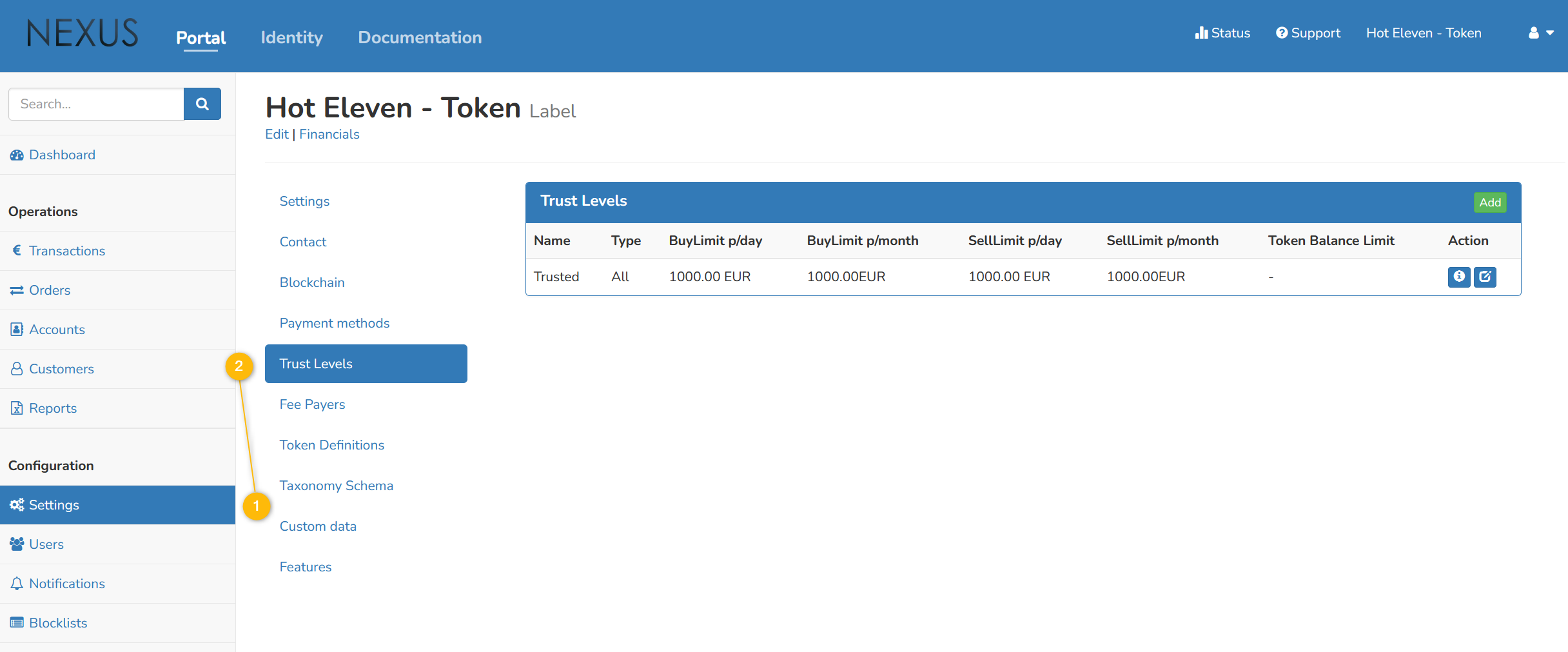
- Navigate to Label Partner settings
- Go to the Trust Levels section
Creating Trust Levels
- Click "Add" to create a new trust level
- Configure all required and optional limits
- Set the customer entity type (All/Private/Business)
- Optionally enable "Verify Total Payout" for additional payout restrictions
Editing Trust Levels
- In the Trust Levels list, click the edit icon for the desired trust level
- Modify limits as needed
- Note: Trust level names cannot be changed after creation
- System Administrators can activate/deactivate trust levels
Trust Level Status
Trust levels can be:
- Active: Available for assignment to customers
- Inactive: Not available for new customer assignments (existing customers keep their assignments)
NOTE
Reach out to your Nexus support contact to configure trust levels for your environment.