
Simplified data model
At a first glance of the image below, it is easy to grasp the main fields of the customer entity, namely the unique code, status and trustlevel. Following, a customer has account(s), which consist in whitelisted buy/sell address-pairs of specific cryptos or blockchains that can be used with specific transaction types. Transactions represent customer initiated exchanges between a crypto/token amount and fiat currency amount.
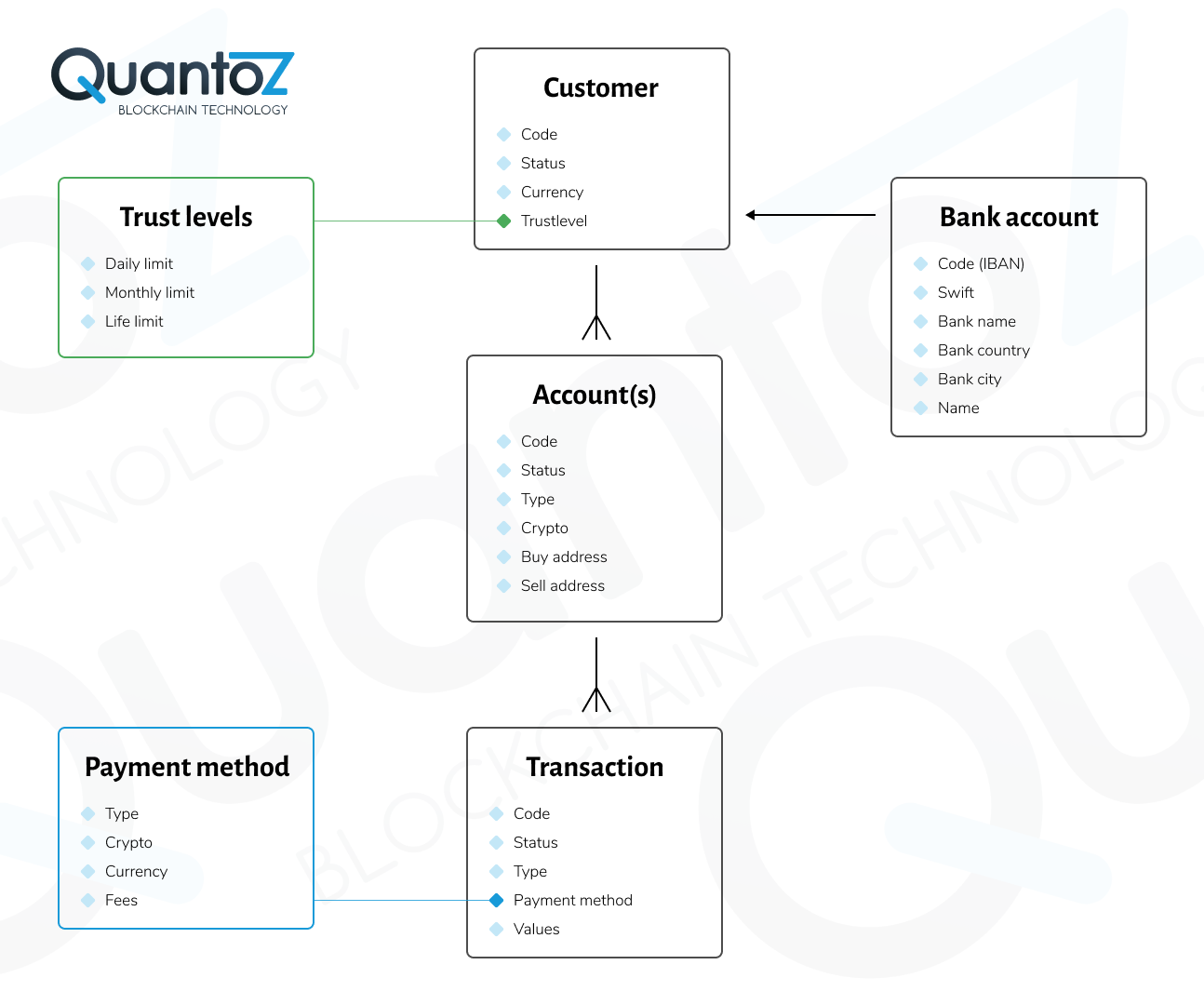
All the data model entities always have a code field as a unique reference for customer, accounts or transactions to be used in the API calls (or in searches in the Nexus portal). The code of a customer is defined by you when creating a new customer (through API or in the Nexus portal), while the codes of accounts or transactions are defined by Nexus.
Moreover, it is possible to add the IP address of the source of the client request in all the customer, account and transaction API calls. Since these IP addresses are stored, they can be used for compliance and customer tracing purposes. Furthermore, this option can be used in conjunction with the country IP blocklist functionality, since customers originating from a blocklisted country will be automatically blocked.
Customer entity
Status
The available customer statuses are listed below:
- NEW
- ACTIVE
- BLOCKED
- DELETED
- UNDERREVIEW
Note
See Customer Statuses for detailed information.
Trustlevel
The trustlevel of a customer represents the accepted compliance or fraud risk limits. It works by defining the maximum buy and/or sell amounts per day, month or lifetime. As these limits are reached, no new transactions can be executed.
Properties
On top of the aforementioned trustlevels, it is possible to set additional properties to allow stricter compliance checks (and to optionally filter acceptable trustlevels):
- Business: to differentiate between a business and personal account;
Personal details
Optional fields that can be used to store name, email, address, phone and so forth.
Bank details
Optional records are provided to store the banking details of the customer. These can be used for compliance purposes, or to filter/whitelist acceptable both source bank accounts of payments or payout bank accounts. The fields are the following:
- Currency
- Bankname
- Bankcity
- Bankcountry
- Name (as known by the bank)
Entity data
In addition to the standard data model fields, it is possible to define custom fields for each customer record through the API.
Account entity
Status
- NEW
- ACTIVE
- DELETED
Note
See Account Statuses for detailed information.
Crypto/Blockchain
The token blockchain (token model) for which a specific account whitelists blockchain addresses and/or transaction types.
Type
Depending on the account type, several transaction types can be executed and/or addresses can be whitelisted:
| Type | Fixed buy address (customer's private address) | Fixed sell address (in Nexus hot wallet) |
|---|---|---|
| Token | Yes (token blockchain account of customer) | No (it is always the token issuing address) |
Buy address (return address)
This is the private address of a customer whitelisted to send crypto or receive tokens. Nexus cannot send crypto to addresses that are not defined in an account with ACTIVE status. The whitelisted addresses can also be used to return the crypto back when the sell transaction limits are exceeded.
Sell address
The address in the Nexus hot wallet assigned to a specific customer.
Transaction entity
Status
- BUYINITIATED
- BUYCANCELED
- SENDING
- SENDDELAY
- BUYCOMPLETED
- SELLINITIATED
- SELLCANCELED
- CONFIRMING
- TOPAYOUT
- PAYOUTONHOLD
- PAYOUTCONFIRMING
- SELLCOMPLETED
- GIFTSENDING
- GIFTCOMPLETED
- RETURNING
- RETURNED
- BLOCKED
- DELETED
Type
BUY, SELL or GIFT are for all Nexus business models. In addition, the custodian model also supports the types SENDOUT, RECEIVING, SWAP and SENDINTERNAL.
Payment method and reference
This field defines the method used for a specific transaction. The payment methods are defined in Nexus to specify different fees types and (callback) URLs for integration with external payment processors. The Payment Service Provider (PSP) reference can be used to store the transaction reference to the payment.
TxId
The Transaction id on the blockchain containing the specific crypto or token action. Available only when the transactions is on-chain (not for custodian buy or sell transaction).
Financial details
All currency values and crypto/token amounts involved with the transaction.